SQL in Practice: Installing PostgreSQL and Writing Your First Queries
A hands-on SQL guide for analysts and IT specialists: install PostgreSQL locally and write your first queries — from CRUD and JOINs to aggregates and transactions.
Hey everyone!
Prologue
As it happens, I became an instructor for a systems analysis course at the open school run by the Digital Academy — the course wrapped up on December 7th. This article will be handy for anyone who wants to experiment with SQL on their own local machine, using one of the most popular databases out there, PostgreSQL.
No mysteries here, I'll lay it all out up front:
- An open school is a format of free, intensive training for "junior" specialists with a bit of experience in their field. The format is used by the Innotech group, T1 Group, and the Digital Academy. The best students get job offers; everyone else walks away with knowledge.
- About me: I'm a director of project management, and also an instructor at the open school for systems analysts and Data Engineers.
- The goal of this article is SQL practice. Installing PostgreSQL and connecting through Docker are secondary: you can experiment on your employer's environment or on open resources just as well.
What is SQL, and do I really need it?
It all depends on your role in the team, the project, and so on — that's the answer you were hoping to hear, right?
But seriously: if you're in IT, you definitely need SQL. The depth varies with your role and grade, and as for technical interviews — I won't even get started.
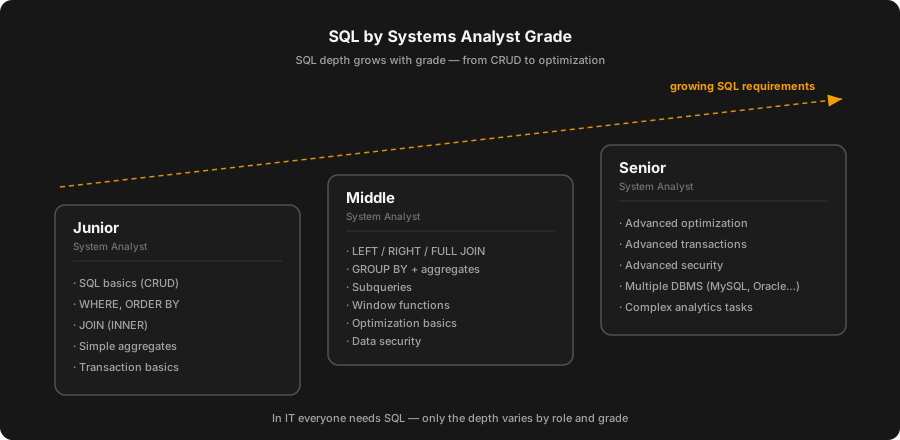
At one company I ran a little study — I mapped the need for SQL against role and grade. This is my own take; I'm not claiming it's the ultimate truth.
Bottom line: SQL matters and you need it. The only question is how to level it up when you're surrounded by cheat sheets and there's no coherent A-to-Z guide anywhere — let alone a free one :) I'll try to help a little. Today it's the setup; the practice comes a bit later.
Installation and setup
Let's get to it! To prep for an interview…
(The step-by-step installation screenshots from the original post are omitted here.)
After 15 steps you'll have PostgreSQL installed, and you can experiment with the environment to your heart's content. Congrats on your first step!
A bit about what an analyst needs to know
When SQL was created, its notations, standards, a mountain of theory — I'm not sure you need any of that right now. But you definitely need practice! I'm not dismissing theory: it shows how deeply you know the language and broadens your technical horizons — I'll try to cover it some other time. For now, though, let's practice.
Maybe you've got an interview tomorrow, you're not ready yet, and you're frantically searching for what you need — but the sea of materials is full of junk, and it eats up a ton of time. Or maybe you're already a working specialist who needs to dive into SQL, but there's no clear handbook at hand. I won't promise a placebo, but I do want to give you a clear tutorial where everyone can take what they need.
This article is for beginners and mid-level specialists; seniors might find it dull.
What does an analyst need to know?
- SQL basics. Knowing the core SQL operators, such as CRUD:
SELECT,INSERT,UPDATE,DELETE— for working with data. - Filtering and sorting data. Using
WHEREconditions to filter andORDER BYto sort data. - Joining tables. Understanding the different join types (
JOIN), such asINNER JOIN,LEFT JOIN,RIGHT JOIN,FULL JOIN, to combine data from different tables. - Grouping data. Using
GROUP BYand aggregate functions (COUNT,SUM,AVG,MAX,MIN) to group data and run calculations over groups. - Subqueries and nested queries. Using subqueries to build complex queries.
- Window functions. Applying window functions such as
ROW_NUMBER,RANKto run calculations within a defined set of rows ("windows"). - Query optimization. Understanding indexes, query execution plans, and other aspects for optimizing query performance.
- Transactions and version control. The basics of working with transactions, transaction isolation levels for maintaining data integrity. Senior!!!
- Data security. Understanding roles, permissions, and other security aspects to protect data. Senior!!! (Or you might never need it at all.)
- Working with different databases. Being aware of the differences in syntax and functionality across different database management systems, such as MySQL, PostgreSQL, Oracle, SQL Server.
Analyst levels and SQL
Now let's break the knowledge down by analyst level.
Junior System Analyst
- SQL basics (CRUD);
- Filtering and sorting data (
WHERE); - Joining tables (
JOIN); - Simple aggregate functions;
- Basics of working with transactions.
Middle System Analyst
- Advanced table joins (
LEFT,RIGHT,FULL JOIN...); - Grouping data combined with aggregate functions;
- Subqueries;
- Window functions;
- Basics of query optimization;
- Data security.
Senior System Analyst
- Advanced query optimization;
- Advanced transactions and version control;
- Advanced data security;
- Working with different databases;
- Practice solving complex analytical problems.
SQL statements by category
Now let's clearly split the language's statements into categories and describe each one.
1. DDL (Data Definition Language)
CREATE: creating new tables, views, indexes, etc.ALTER: modifying the structure of existing tables.DROP: deleting tables, views, indexes, etc.TRUNCATE: clearing all rows from a table while keeping its structure.
2. DQL (Data Query Language)
SELECT: retrieving data from the database.
3. DML (Data Manipulation Language)
INSERT: inserting new rows into a table.UPDATE: updating existing rows in a table.DELETE: deleting rows from a table.
4. DCL (Data Control Language) — ANALYSTS DON'T USE IT!
GRANT: granting access rights to users.REVOKE: revoking access rights from users.
5. TCL (Transaction Control Language) — DOESN'T WORK WITHIN NoSQL!
COMMIT: committing all changes made within a transaction.ROLLBACK: undoing all changes made within the current transaction.SAVEPOINT: setting points you can roll back to within a transaction.SET TRANSACTION: setting properties for a transaction.
Practice!
For practice we'll use the classic Employees and Departments tables.
Logical data model
Employees:
EmployeeID(employee ID);FIO(full name);DepartmentID(department ID);Salary(salary).
Departments:
DepartmentID(department ID);DepartmentName(department name).
0. Prep work
First, let's create the Employees and Departments tables and fill them with test data according to the logical model.
STEP 1. Creating the departments table — Departments
CREATE TABLE Departments (
  DepartmentID INT PRIMARY KEY,
  DepartmentName VARCHAR(100)
);
STEP 2. Creating the employees table — Employees
CREATE TABLE Employees (
  EmployeeID INT PRIMARY KEY,
  FIO VARCHAR(150),
  DepartmentID INT,
  Salary DECIMAL(10, 2),
  FOREIGN KEY (DepartmentID) REFERENCES Departments(DepartmentID)
);
STEP 3. Inserting data into the departments table — Departments
INSERT INTO Departments (DepartmentID, DepartmentName) VALUES
(1, 'IT'),
(2, 'Human Resources'),
(3, 'Finance'),
(4, 'Marketing'),
(5, 'Sales'),
(6, 'Research and Development'),
(7, 'Customer Service'),
(8, 'Legal'),
(9, 'Administration'),
(10, 'Production');
STEP 4. Inserting data into the table — Employees
INSERT INTO Employees (EmployeeID, FIO, DepartmentID, Salary) VALUES
(1, 'Иванов Иван Иванович', 1, 50000),
(2, 'Петров Петр Петрович', 2, 45000),
(3, 'Сидоров Сидор Сидорович', 3, 48000),
(4, 'Алексеев Алексей Алексеевич', 1, 52000),
(5, 'Николаев Николай Николаевич', 4, 43000),
(6, 'Васильев Василий Васильевич', 5, 47000),
(7, 'Максимов Максим Максимович', 6, 51000),
(8, 'Григорьев Григорий Григорьевич', 7, 45000),
(9, 'Дмитриев Дмитрий Дмитриевич', 8, 49000),
(10, 'Егоров Егор Егорович', 9, 44000);
1. SQL basics
Now — on to what every analyst, and really every IT specialist, should know.
SELECT. Get all data about employees (* — returns every column):
SELECT * FROM Employees;Get the full name and salary of employees (naming the exact attributes you want, returns only those):
SELECT fio, salary FROM Employees;INSERT. Add a new employee:
INSERT INTO Employees (EmployeeID, Name, DepartmentID, Salary) VALUES (11, 'Иванов Иван Акатьевич', 3, 50000);After adding the employee, run a SELECT again and confirm they were created.
UPDATE. Raise the salary of the employee with ID 11 by 5000:
UPDATE Employees SET Salary = Salary + 5000 WHERE EmployeeID = 11;After the update, run a SELECT again and confirm the data changed.
DELETE. Delete the employee with ID 11:
DELETE FROM Employees WHERE EmployeeID = 123;2. Filtering and sorting data
Get the names of employees earning more than 30000, sorted by salary in descending order:
SELECT Name
FROM Employees
WHERE Salary > 30000
ORDER BY Salary DESC;
3. Joining tables / set operations
Get a list of employees along with the names of their departments:
SELECT E.Name, D.DepartmentName
FROM Employees E
INNER JOIN Departments D ON E.DepartmentID = D.DepartmentID;
4. Simple aggregate functions
Get the average salary for each department:
SELECT D.DepartmentName, AVG(E.Salary) AS AverageSalary
FROM Employees E
INNER JOIN Departments D ON E.DepartmentID = D.DepartmentID
GROUP BY D.DepartmentName;
!!! Remember: if you output extra columns alongside an aggregate function, you must group by them — without GROUP BY the query simply won't run.
Get just the average salary:
SELECT AVG(E.Salary) AS AverageSalary
FROM Employees E
INNER JOIN Departments D ON E.DepartmentID = D.DepartmentID;
!!! Remember: but if you output only the value of the aggregate function, with no extra columns — you don't need GROUP BY.
Get the total salary for each department:
SELECT D.DepartmentName, SUM(E.Salary) AS SumSalary
FROM Employees E
INNER JOIN Departments D ON E.DepartmentID = D.DepartmentID
GROUP BY D.DepartmentName;
5. Transactions (ACID)
Basic transaction
Increase the salary of the employee with EmployeeID = 1 by 10000 and, at the same time, decrease the salary of the employee with EmployeeID = 2 by 10000, ensuring both operations run as a single transaction.
START TRANSACTION;
UPDATE Employees SET Salary = Salary + 10000 WHERE EmployeeID = 1;
UPDATE Employees SET Salary = Salary - 10000 WHERE EmployeeID = 2;
COMMIT;
Transaction with a rollback
Let's try running the same updates as in the previous example, but roll the transaction back if an employee's salary goes negative.
START TRANSACTION;

UPDATE Employees SET Salary = Salary + 10000 WHERE EmployeeID = 1;

-- Suppose the salary of the employee with EmployeeID = 2 goes negative
-- There should be a check here, but for the example we just roll back
ROLLBACK;

-- If the check had shown everything was fine, we'd use COMMIT.
Using SAVEPOINT
Within a single transaction, change the salaries of several employees, but if one of the updates errors out, roll back to a specific point rather than canceling the entire transaction.
START TRANSACTION;

SAVEPOINT Savepoint1;
UPDATE Employees SET Salary = Salary + 5000 WHERE EmployeeID = 3;

SAVEPOINT Savepoint2;
UPDATE Employees SET Salary = Salary - 2000 WHERE EmployeeID = 4;

-- Suppose the update for EmployeeID = 4 caused an error
ROLLBACK TO Savepoint1;

COMMIT;
Phew! I'm waiting for your feedback — let me know how it went for you. If needed, I'll add screenshots of how everything should look, or make edits. Install PostgreSQL and keep practicing. In the next part I'll cover what a mid-level specialist needs, and if there's time left over — the senior stuff too. See you around!
Originally published on my Telegram channel @it_underside.
Yours, DPUPP
Related Articles
SQL in Practice: Installing PostgreSQL and Writing Your First Queries
A hands-on SQL guide for analysts and IT specialists: install PostgreSQL locally and write your first queries — from CRUD and JOINs to aggregates and transactions.
Data Exchange Formats: From JSON to Protobuf
A deep dive into data exchange formats: where JSON lives, why XML still matters, what makes YAML great, and when it is time to switch to binary Protobuf, Avro, and MessagePack — tied to APIs and message brokers.
Event Storming Without the Hype: Pros, Cons, and a Sticky Note on Your Forehead
A personal take on Event Storming after more than one "event storm": where it genuinely saves a team, where it turns into pointless sticker-therapy, and what it takes to keep a session from going down the drain.